Dash View of Connected Tower/Batch Uploads
By the CellInfo Dev Team | Published: 9th February 2026
🚀 NEW: Simple Dash View Mode
Stay informed while on the move with a clean, real-time data overlay during logging.
- Network Mode & Sharing: Instant visibility of 5G SA/NSA, LTE+, and connection types like MOCN, MORAN, MOCA, or ROAMING.
- Deep Cell Details: Monitor CellID, gNB/eNB CID, TA, and TAC at a glance.
- Session Tracking: Live display of GPS location, total unique towers discovered, and total samples collected.
🛠️ IMPROVED: Robust Data Uploads
We’ve overhauled how data is sent to OpenCellID and BeaconDB for a more reliable experience.
- Chunked Transfers: Uploads are now split into smaller “chunks,” making them much more stable on weak connections.
- Automatic Retry: If an upload fails, the app will automatically try again.
- Offline Queue: If you lose signal entirely, your data is saved and will automatically resume uploading once your connection is restored.
In the context of the CellInfo Android app, MOCA stands for Multi-Operator Core Agreement (sometimes referred to as “Core Aggregation”). While MOCN and MORAN are standard industry terms for sharing infrastructure between different companies (like Vodafone and Three), MOCA is a term used in this application’s logic to handle a specific scenario with the same operator.
What it means, if your SIM is registered to 234-30, But you are currently connected to a mast broadcasting 234-33. Cellinfo recognizes that the “Brand” and “Operator” names (EE) match in our database.
What it means: You will see MOCA when you are connected to a network that has a different network code (MCC-MNC) than your SIM, but actually belongs to the same operator.
Example: In the UK, EE uses several network codes (like 234-30, 234-33, and 234-34).
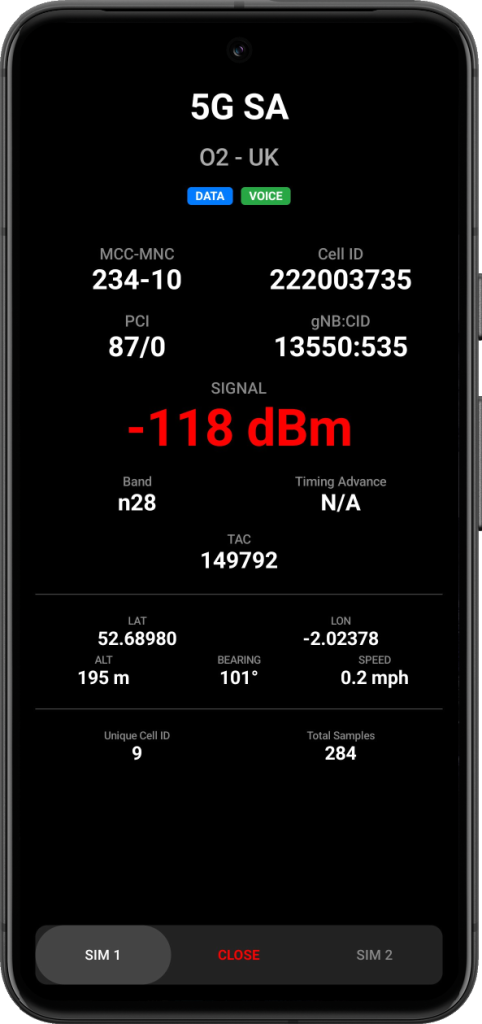
See your current cell towers values as you move around.
📲 Get the Update
Update the app today and let us know if you find a 5G Standalone cell in your area